← Back to blog
How to Get Your First YouTube Recap
November 19, 2026 · 2 min read
Recapfy turns a YouTube video into a short written recap, so you can get the main points of a long podcast or market update without watching all of it. Your first one takes about a minute.
1. Create your account
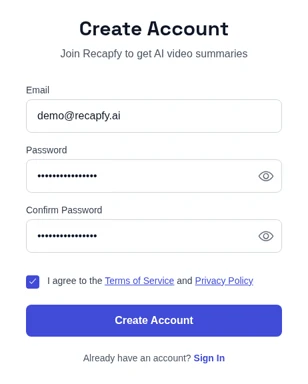
Go to recapfy.ai and click Get Started. Enter your email, choose a password, accept the terms and click Create Account.
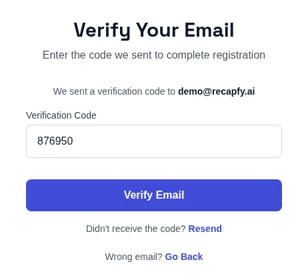
Recapfy then emails you a 6-digit code. Enter it on the Verify Your Email screen and click Verify Email. If it doesn’t arrive, check your spam folder or click Resend. Once verified, sign in with your email and password.
The Free plan needs no card and includes about 10 recaps a month. That estimate is based on 1-hour videos, so shorter videos use less and longer ones use more.
2. Paste a YouTube link
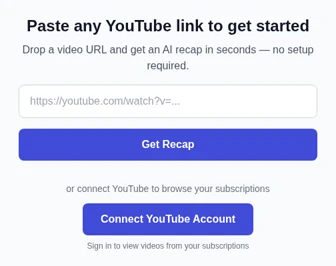
After signing in you land on Channels. Paste the link of any YouTube video into the box and click Get Recap. Recapfy asks which language you want the recap in; keep the default or pick another, then click Request Recap.
3. Read your recap
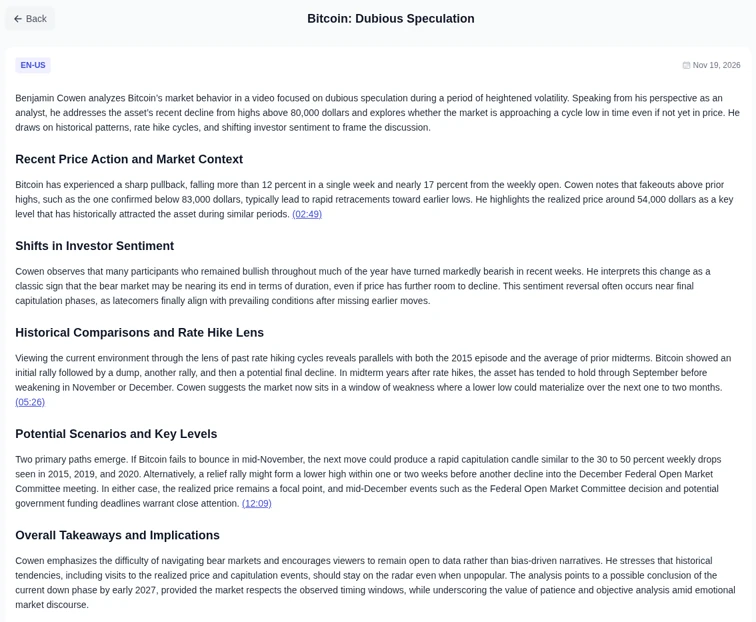
The recap is usually ready within a minute, and you can leave the page while it’s generated. It opens with a short summary of the whole video, followed by sections on each main topic. Each section ends with a timestamp: click it to jump to that moment in the video.
You’ll find every recap you’ve made later under Recaps.
Next steps
•
Connect YouTube to pick videos straight from your subscriptions (guide coming soon).
•
Get your recaps in another language (guide coming soon).
•
Ask questions about a video in chat (guide coming soon).
Recapfy
AI-powered YouTube video summaries that save you hours of watching time.
© 2026 Recapfy. All rights reserved.